Discord
Send each new submission to a Discord channel, so your team sees new leads, sign-ups, and support requests where they already talk. Every submission arrives as a tidy message with one line per form field and a link to the full submission in Formtorch.
The connection is a Discord channel webhook. There’s no bot to invite and no Discord account to authorize. Setup takes about five minutes.
What you need
- A Formtorch form on the Pro plan
- A Discord account (the browser version of Discord works; you don’t need the desktop app)
- Manage Webhooks permission on the Discord channel (server owners and admins have it)
Connect a form to Discord
Pick a server and channel
Use the channel where your team should see submissions. If you’d like to try the integration first without notifying anyone, create a private test server:
- In Discord, click the + button at the bottom of the server list on the left.
- Choose Create My Own, then For me and my friends.
- Name it something obvious, such as
Formtorch Test, and click Create. - Create a text channel, such as
#form-submissions.
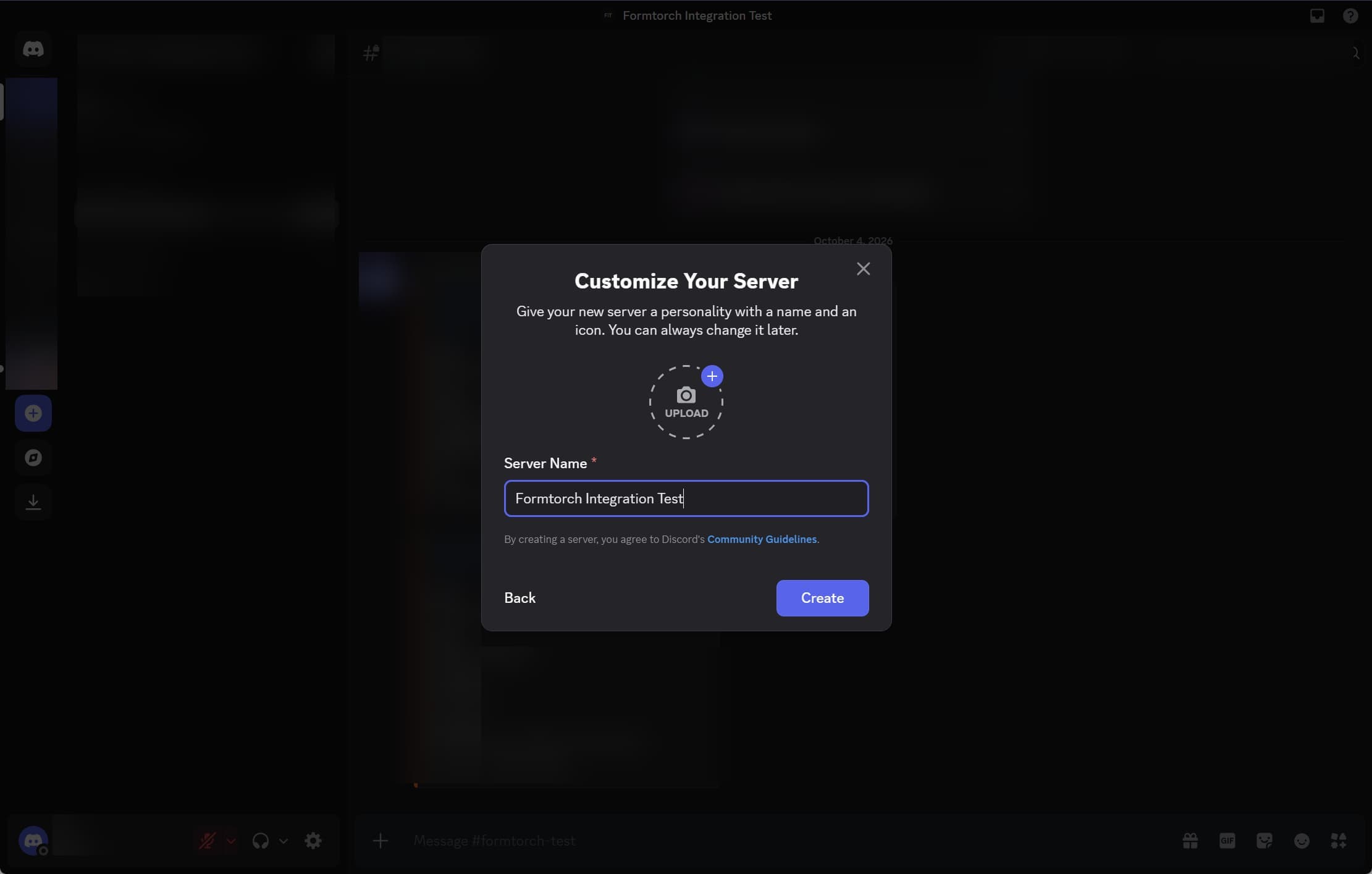
You can keep this server private. There’s no need to invite anyone.
Create a webhook in Discord
-
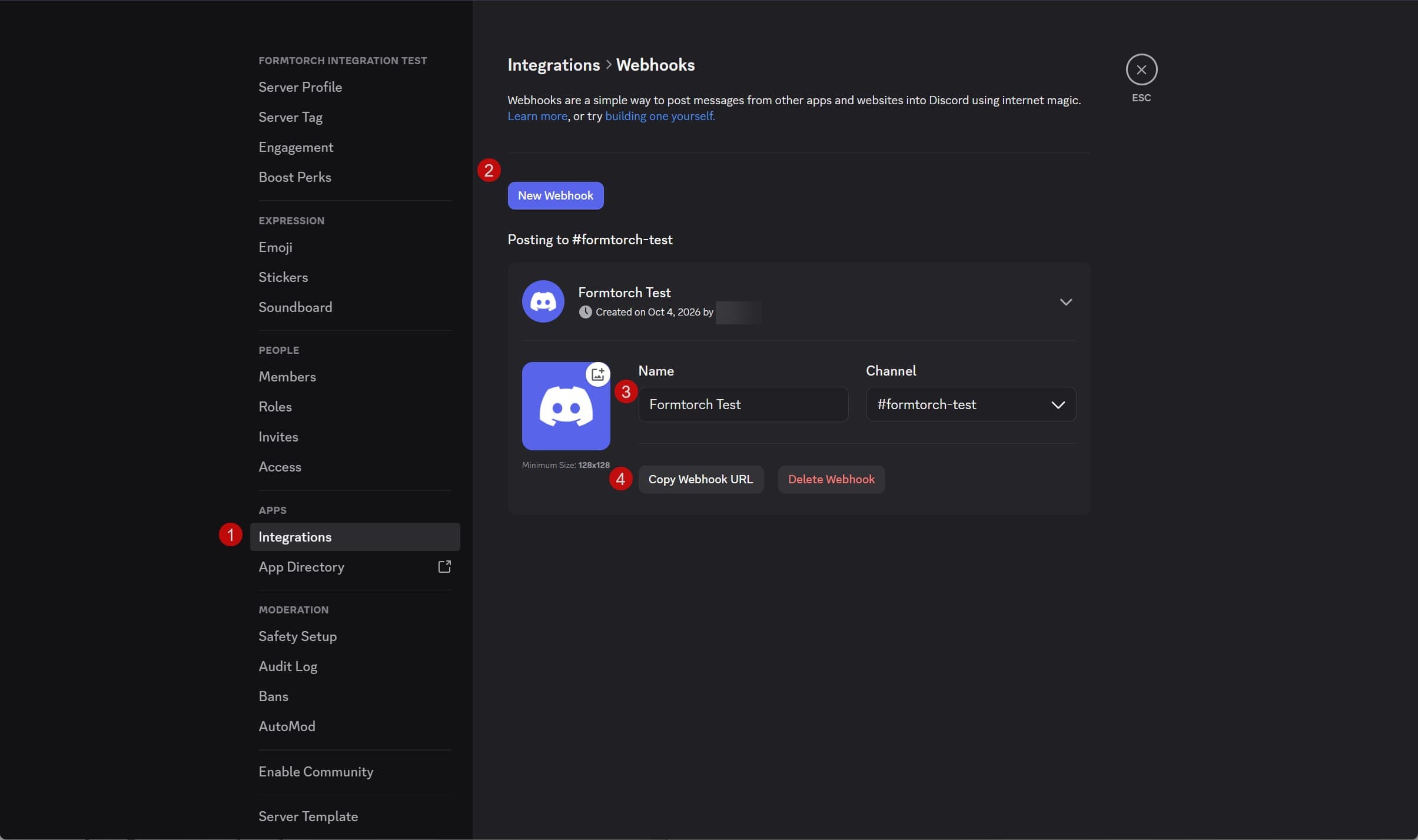
Click the server name at the top left, then Server Settings → Integrations.
-
Click Webhooks, then New Webhook. Discord creates one with a random name.
-
Click the new webhook to expand it. Give it a name (for example,
Formtorch: Contact form) and pick the channel submissions should go to. The name is shown as the destination’s label in Formtorch. -
Click Save Changes if Discord shows it, then click Copy Webhook URL.
The URL looks like https://discord.com/api/webhooks/123456789012345678/abcd....
Treat the webhook URL like a password: anyone who has it can post to your channel. Paste it only into Formtorch. Don’t share it in chat, commit it to Git, or put it in a screenshot.
Add the URL to your form in Formtorch
-
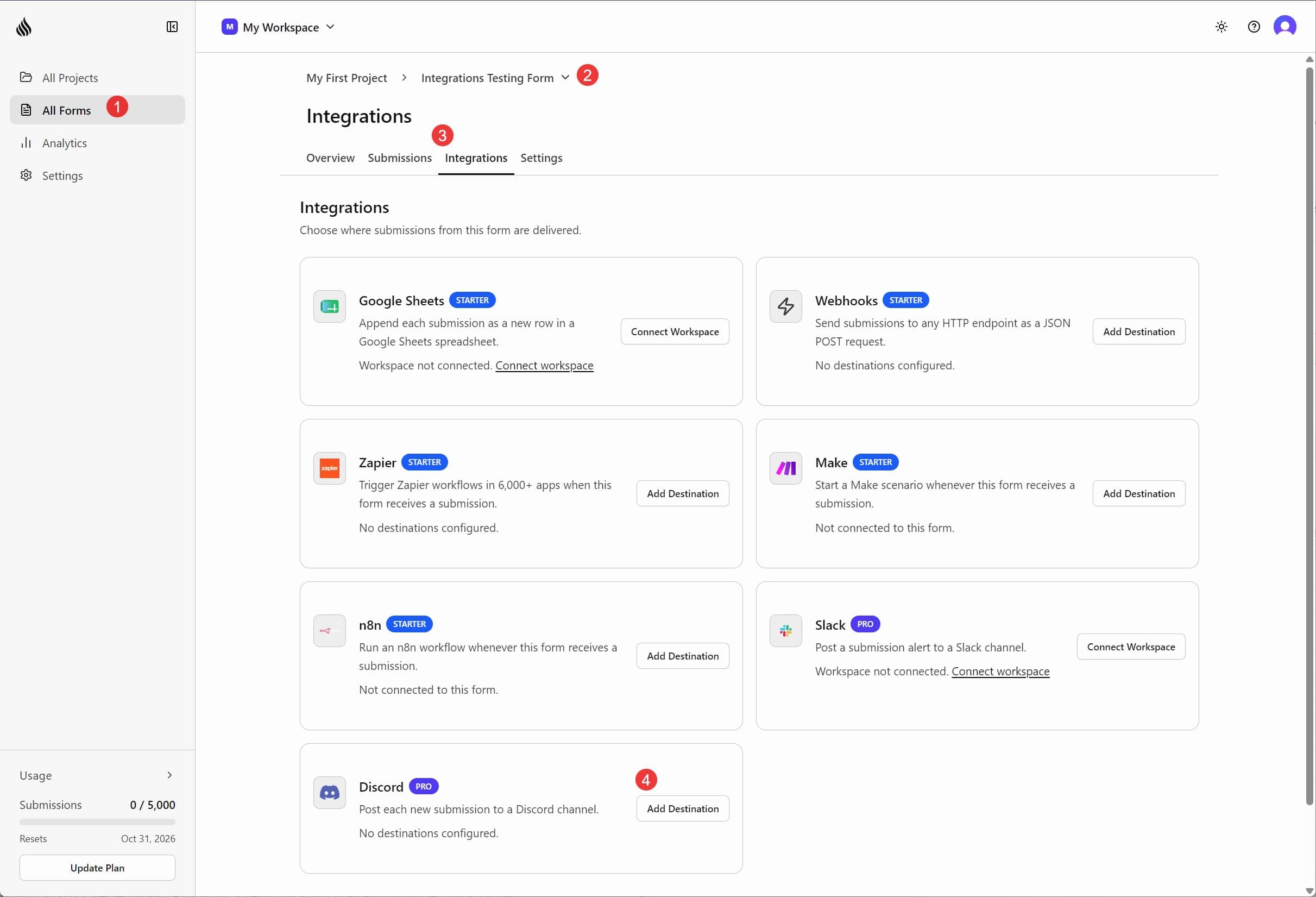
Open the form in the dashboard and go to Integrations.
-
On the Discord card, click Add Destination, then Add Destination again in the panel that opens.
-
Paste the webhook URL. The label is optional; it defaults to the webhook’s name in Discord. Click Add Destination.
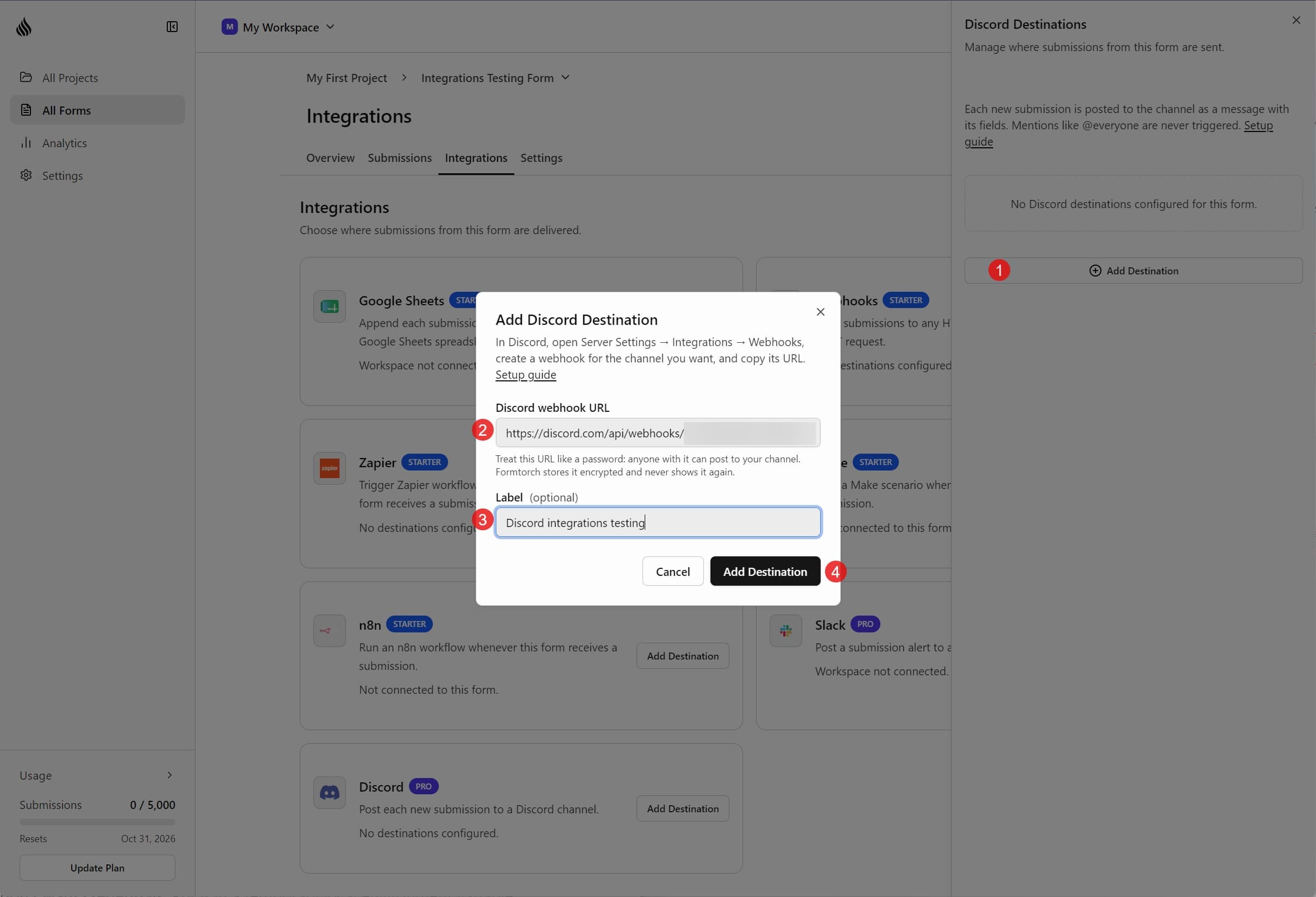
Formtorch checks the URL with Discord before saving it, so a mistyped or deleted webhook is caught right away. Once saved, the URL is stored encrypted and never shown again: the panel lists the destination by its webhook name only.
Send a test message
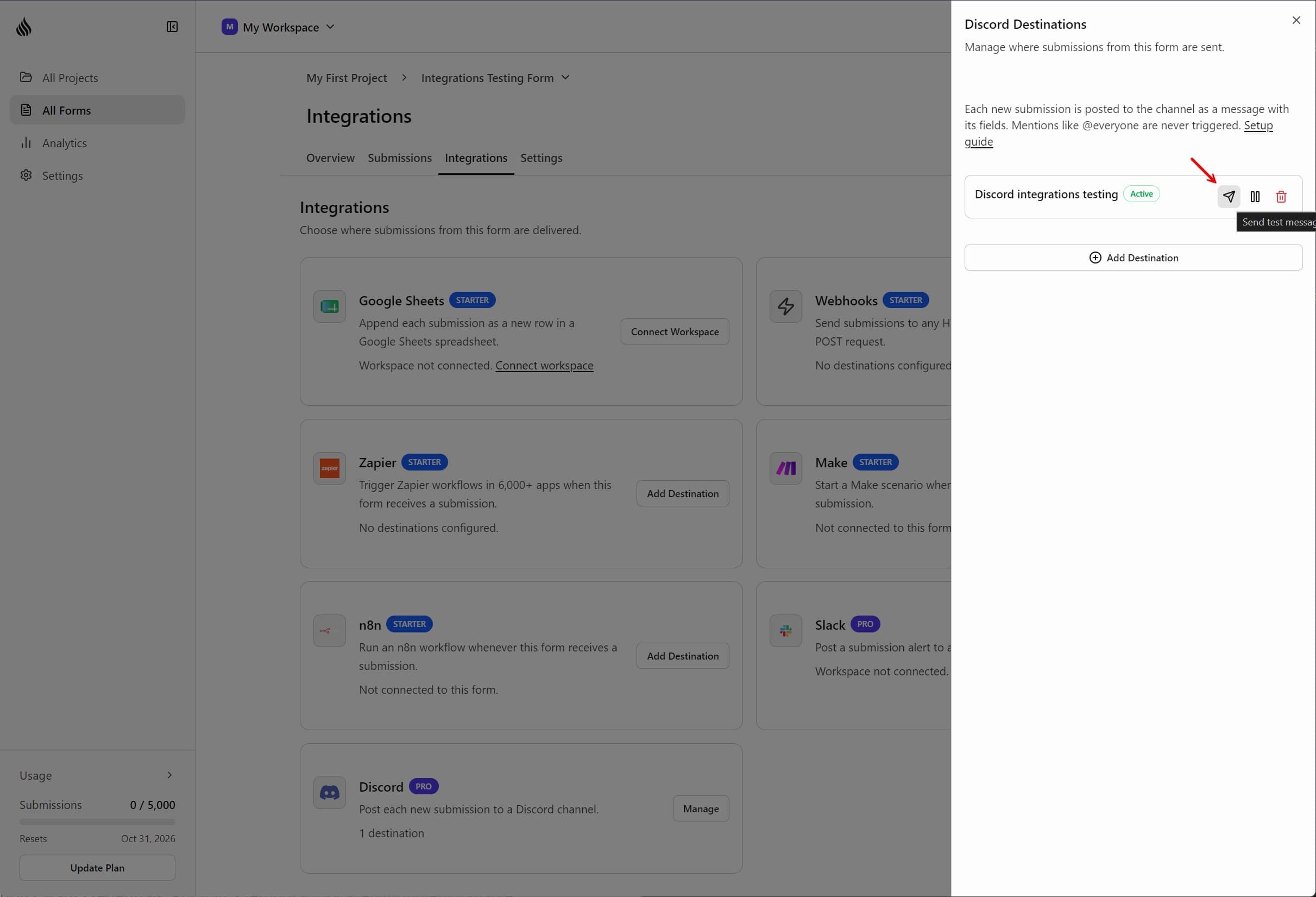
In the Discord panel, click the Send test message icon next to the destination.
Within a few seconds, a message titled Test message: your form name appears in your channel, with sample name, email, and message fields and a footer that reads Formtorch · test message.
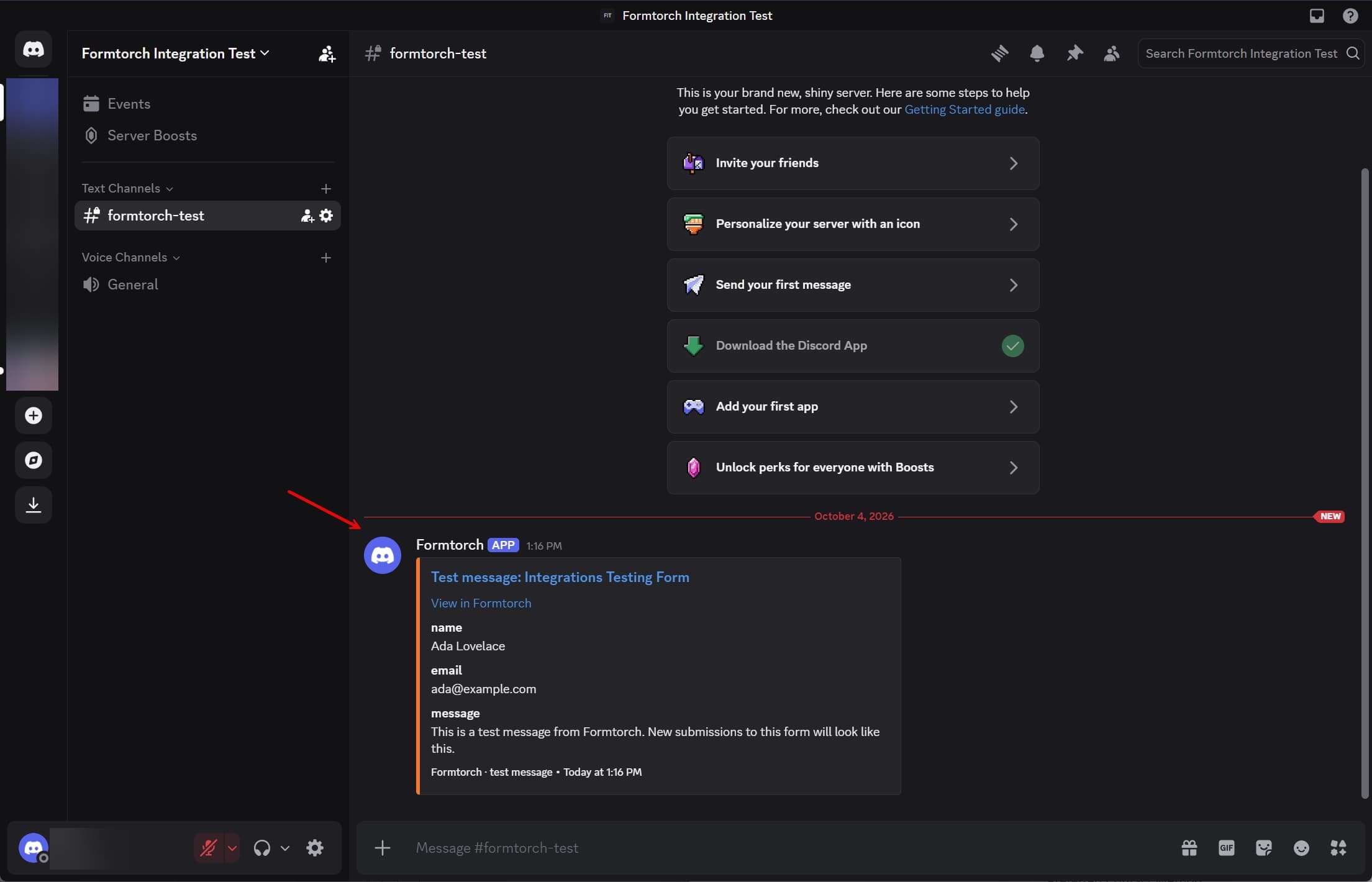
If it arrives, the connection works.
Send one real submission
The test message checks the connection to Discord. A real submission checks the whole path: your form, Formtorch, and the post in your channel.
Submit your form once from your site, like a visitor would. If you don’t have a page handy, save this as an HTML file, replace YOUR_FORM_ID with your form’s ID, and open it in a browser:
<form action="https://formtorch.com/f/YOUR_FORM_ID" method="POST">
  <input name="name" placeholder="Name" />
  <input name="email" type="email" placeholder="Email" />
  <textarea name="message" placeholder="Message"></textarea>
  <button type="submit">Submit</button>
</form>
Fill it in with something like:
-
Name:
Test Visitor -
Email:
test@example.com -
Message:
Testing the Formtorch Discord integration.
@everyone @here
[Account verification](https://example.com)
A message titled New submission: your form name appears in your channel with one field each for name, email, and message. Two things to look for:
@everyoneand@hereappear as plain text and don’t notify anyone.- The link is shown as its literal text,
[Account verification](https://example.com), rather than as a clickable link with a disguised label.
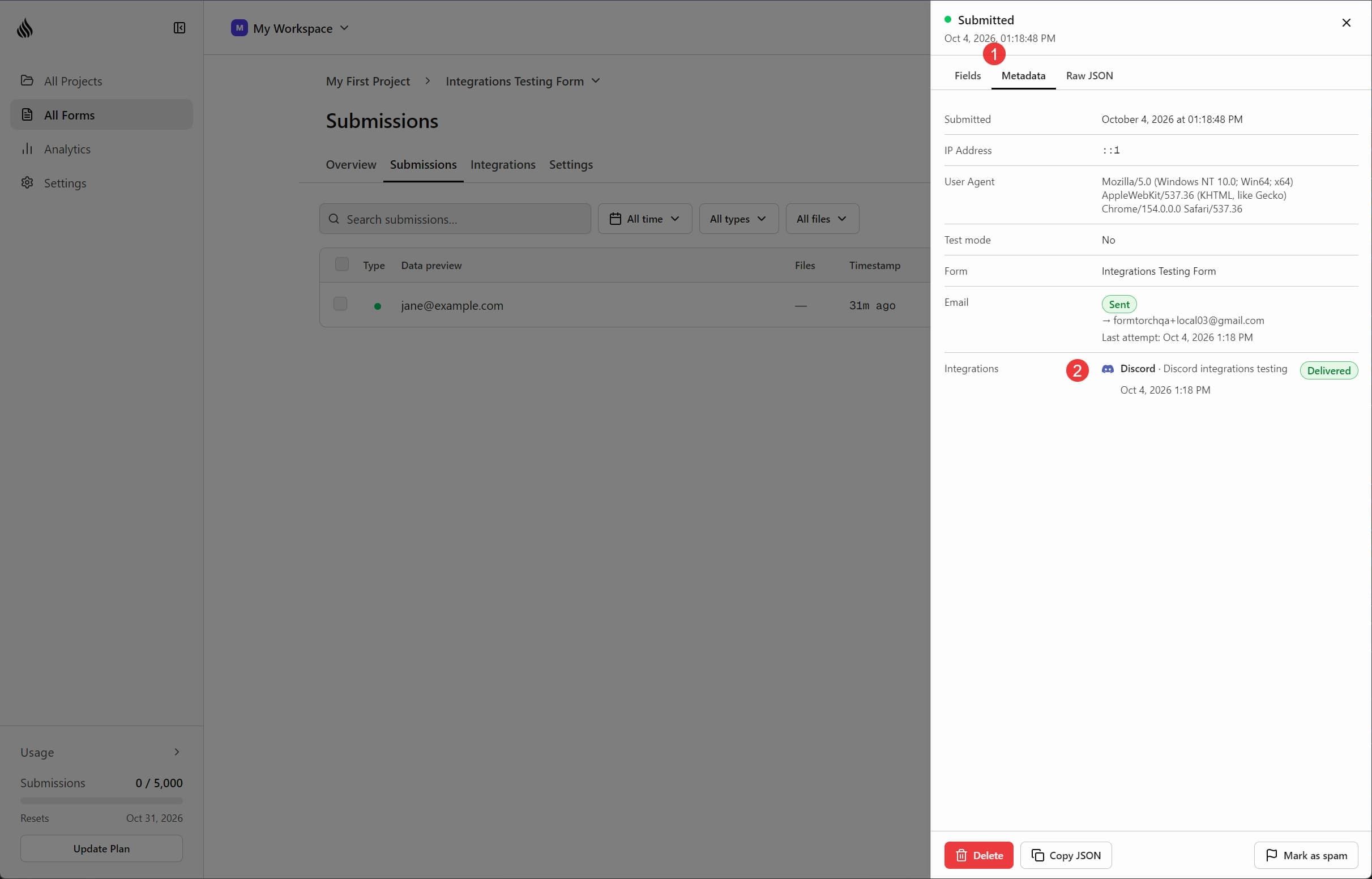
In Formtorch, open the form’s Submissions tab and hover over (or click) the Sent badge in the submission’s Delivery column. The Delivery history popover lists an Original · Discord · Delivered entry. You can also open the submission and check Integrations on its Metadata tab, which shows the destination’s name and any error.
Test submissions (_test) and submissions flagged as spam are never posted.
If nothing arrives, send a normal submission from your live form.
That’s it. Every new submission on that form is now posted to your channel.
What the message contains
- Title:
New submission: <form name>, linking to the submission in your dashboard - One field per form field, using the
nameattributes from your HTML - Files: download links for uploaded files, when file uploads are on
- A warning line when spam filtering flagged the submission as suspicious
Reserved fields such as _redirect and _honeypot are left out.
Discord limits how much one message can hold, so very long values are shortened, and a form with many fields shows the first ones plus a View the full submission link.
Safe by default
- No pings. Mentions are always disabled, so a submission containing
@everyone,@here, or a role mention can’t notify anyone. - No disguised links. Formatting in submitted text is shown as plain text, so a visitor can’t make a link look like it points somewhere else.
- Your webhook URL stays private. Formtorch stores it encrypted and never shows it again after you save it.
Limits
| Plan | Discord |
|---|---|
| Free | Not available |
| Starter | Not available |
| Pro | Up to 5 channels per form |
Discord limits each webhook to about 30 messages per minute. If a burst of submissions goes over that, Formtorch retries the extra messages automatically.
Pausing and removing
Click Manage on the Discord card to open the panel. From there you can pause a destination, which stops posting without deleting it, or remove it. Settings → Integrations shows which forms use Discord.
Troubleshooting
Each destination shows its last delivery result in the Discord panel.
The test message works, but real submissions don’t arrive. Check that you’re sending a normal submission, not a _test one, and that it wasn’t flagged as spam. Also check that the destination isn’t paused.
“Discord webhook was deleted or its URL is no longer valid,” or the test says “Discord says this webhook no longer exists.” The webhook was removed in Discord. Delete the destination in Formtorch and add a new webhook URL.
“Discord denied the request.” Check that the webhook’s channel still exists and the webhook still has access to it.
“Must be a Discord webhook URL.” Copy it again with Copy Webhook URL. It looks like https://discord.com/api/webhooks/.... Links to a channel, a message, or a server invite won’t work.
If your webhook URL leaks
Anyone with the URL can post to your channel. In Discord, delete the webhook (Server Settings → Integrations → Webhooks), create a new one, then delete the old destination in Formtorch and add the new URL.
See the pricing page for a full plan comparison.